Kubernetes cluster architecture
What the control plane and worker nodes do, the parts inside each, and how they work together to run your apps.
· Updated
Kubernetes is an open-source container orchestration platform used to deploy, manage and scale containerised applications.
When running applications across multiple containers and servers, managing them individually can become difficult. Kubernetes automates many of these tasks, including:
- Deploying applications.
- Scaling applications up or down.
- Restarting failed containers.
- Distributing workloads across multiple machines.
- Managing application networking.
- Maintaining the desired state of applications.
A Kubernetes cluster consists of two main parts:
- Control plane: manages the cluster and makes decisions about workloads.
- Data plane (worker nodes): runs the applications and their containers.
The control plane manages the worker nodes and ensures that the cluster operates according to its desired configuration.
Containers first
Before looking at Kubernetes architecture, it helps to understand containerisation.
Containerisation is the process of packaging an application together with its dependencies, libraries and configuration files into a container.
This allows applications to run consistently across different computing environments.
For example, an application might run on a developer's local machine, a testing environment and a production server. Containerisation helps ensure that the application behaves consistently across these environments.
What is a container?
A container is an isolated environment that runs an application and its dependencies.
Unlike virtual machines, containers share the host operating system kernel rather than requiring a separate operating system for each instance.
Docker is a popular platform for building and running containers.
For example:
docker run -d -p 8080:80 nginxThis command starts an Nginx container and maps port 8080 on the host to port 80 inside the container.
Why Kubernetes?
Running a few containers on a single machine is relatively straightforward.
However, managing hundreds of containers across multiple machines introduces additional challenges.
For example:
- What happens if a container crashes?
- How do you distribute containers across multiple servers?
- How do you scale an application when traffic increases?
- How do containers communicate with each other?
- How do you ensure the required number of application instances are running?
Kubernetes addresses these challenges by automating container orchestration.
Cluster architecture
A Kubernetes cluster consists of a control plane and one or more worker nodes.
The control plane manages the cluster, while worker nodes provide the resources required to run applications.
The two main areas are:
| Component | Responsibility |
|---|---|
| Control Plane | Manages and maintains the cluster. |
| Worker Nodes | Run application workloads inside Pods. |
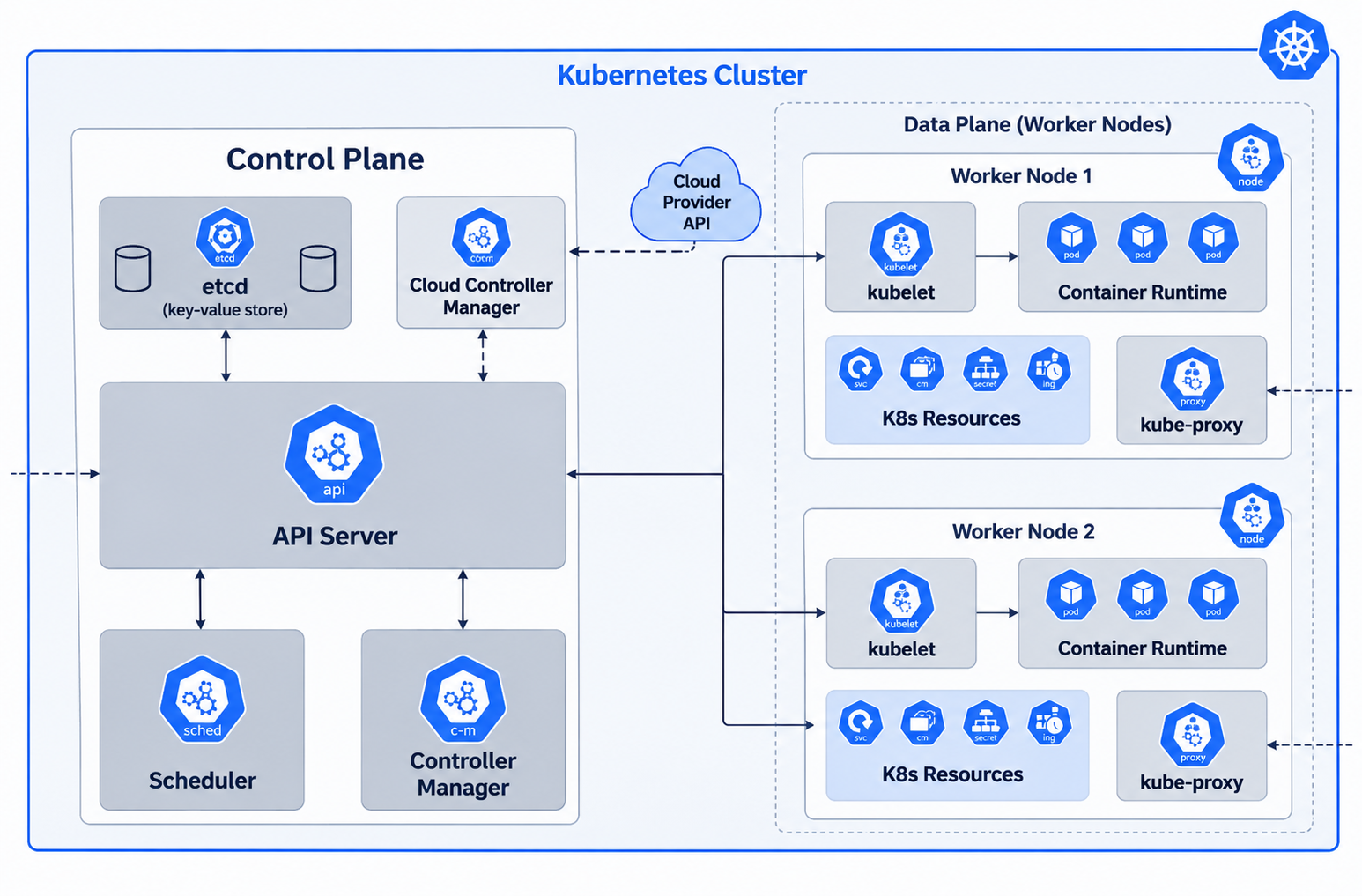
The control plane contains several components that communicate through the Kubernetes API server.
Worker nodes also communicate with the API server to receive instructions and report their status.
The diagram shows the main components of a cluster and how the control plane talks to the worker nodes.
The control plane
The control plane is made up of:
- etcd
- API server
- Scheduler
- Controller manager
- Cloud controller manager (optional)
Each component has a specific responsibility.
etcd
etcd is a distributed key-value store used by Kubernetes to store cluster data.
It stores information about the cluster, including:
- Nodes.
- Pods.
- Deployments.
- Services.
- Configuration.
- Cluster state.
Think of etcd as the database behind Kubernetes.
How does it interact with other components?
The API server communicates with etcd to read and write cluster data.
Other Kubernetes components generally access cluster state through the API server rather than communicating directly with etcd.
For example, when you create a Deployment, the API server processes the request and persists the corresponding resource data in etcd.
Important
etcd is critical to the cluster. Losing its data can mean losing the cluster's stored state, so back it up regularly.
API server (kube-apiserver)
The API server is the central communication point of the Kubernetes control plane.
It exposes the Kubernetes API and allows users and other components to interact with the cluster.
Whenever you use kubectl to create, update or retrieve Kubernetes resources, your request is sent to the API server.
For example:
kubectl get nodesThis command requests information about the cluster's nodes through the API server.
The API server is responsible for:
- Receiving API requests.
- Authenticating and authorising requests.
- Validating resource configurations.
- Processing resource updates.
- Communicating with etcd to persist cluster data.
How does it interact with other components?
The API server acts as the communication layer between the control plane and worker nodes.
For example:
- A user submits a Deployment configuration.
- The API server validates the request.
- The Deployment information is stored in etcd.
- The scheduler identifies Pods that need a worker node.
- The scheduler communicates its scheduling decision through the API server.
Other components monitor the API server for changes to the resources they manage.
Scheduler (kube-scheduler)
The scheduler is responsible for deciding which worker node should run a newly created Pod.
When a Pod is created, it does not automatically know which worker node it should run on.
The scheduler identifies Pods that have not yet been assigned to a node and selects a suitable worker node.
It considers several factors, including:
- Available CPU and memory.
- Resource requests.
- Node availability.
- Scheduling constraints.
- Node affinity and anti-affinity rules.
- Other scheduling policies.
Example:
Imagine a Kubernetes cluster with two worker nodes:
| Worker Node | Available CPU | Available Memory |
|---|---|---|
| Worker Node 1 | 2 CPU | 4 GB |
| Worker Node 2 | 6 CPU | 12 GB |
A new Pod requires 4 CPU and 8 GB of memory.
The scheduler evaluates the available resources and determines that Worker Node 2 is a suitable location.
It then records the scheduling decision through the API server.
How does it interact with other components?
- Watches the API server for newly created, unscheduled Pods.
- Evaluates available worker nodes.
- Selects a suitable node.
- Updates the Pod's scheduling information through the API server.
The kubelet on the selected worker node then takes responsibility for running the Pod.
Controller manager (kube-controller-manager)
The controller manager runs controllers that continuously monitor the cluster and work to maintain its desired state.
A controller is a process that observes the current state of a resource and takes action when it differs from the desired state.
For example, imagine you deploy an application with three replicas.
You expect Kubernetes to maintain three running Pods.
If one Pod crashes or is deleted, the controller manager helps ensure that a replacement Pod is created.
How does it work?
- A controller monitors the API server for changes.
- It compares the current state with the desired state.
- If a difference is detected, it takes corrective action.
- The API server is updated with the resulting changes.
Some examples of controllers include:
| Controller | Responsibility |
|---|---|
| Node Controller | Monitors node availability and responds when nodes become unavailable. |
| Deployment / ReplicaSet Controllers | Maintain the required number of application Pods through their respective resources. |
| Job Controller | Manages Pods created to complete one-off tasks. |
| EndpointSlice Controller | Maintains EndpointSlice information used by Services to identify backend endpoints. |
The controller manager contains multiple controllers, each responsible for a particular area of the cluster.
Kubernetes calls these reconciliation loops. Controllers continuously work to bring the actual state closer to the desired state.
Cloud controller manager
The Cloud Controller Manager integrates Kubernetes with an external cloud provider.
It allows Kubernetes to interact with cloud infrastructure through the cloud provider's API.
For example, when running Kubernetes on AWS, the Cloud Controller Manager can communicate with AWS APIs to manage cloud-specific resources.
Its responsibilities can include:
- Node management.
- Network route configuration.
- Creating and managing cloud load balancers.
Example:
Imagine you create a Kubernetes Service with the type LoadBalancer.
The Cloud Controller Manager can communicate with the cloud provider to provision an external load balancer.
How does it interact with other components?
The Cloud Controller Manager communicates with:
- The Kubernetes API server to read and update cluster resources.
- The external cloud provider API to manage infrastructure resources.
Unlike the other control plane components, it is specifically responsible for cloud provider integration.
Note
The Cloud Controller Manager is optional. It's used when Kubernetes runs on a supported cloud, and not every cluster needs one.
Worker nodes
The data plane is the worker nodes that provide the computing resources required to run containerised applications.
A cluster can contain multiple worker nodes, depending on its workload and resource requirements.
Each worker node contains several components responsible for running and maintaining Pods.
The main components are:
- Kubelet
- Container runtime
- kube-proxy (optional)
- Pods and other Kubernetes resources
Kubelet
The kubelet is an agent that runs on each worker node.
Its primary responsibility is to ensure that the containers defined in assigned Pods are running and healthy.
The kubelet communicates with the API server to receive Pod specifications and report the status of the node and its Pods.
How does it work?
- The scheduler assigns a Pod to a worker node.
- The API server makes the Pod specification available.
- The kubelet on the selected worker node receives the Pod specification.
- The kubelet instructs the container runtime to create the required containers.
- The kubelet monitors the containers and reports their status.
Example:
If a Pod is assigned to Worker Node 1, the kubelet on Worker Node 1 is responsible for ensuring that the Pod's containers are running.
If a container fails, the kubelet works with the container runtime to restart it according to the Pod's restart policy.
Container runtime
The container runtime is responsible for running containers on a worker node.
While Kubernetes manages the desired state of applications, the container runtime performs the actual container execution.
Examples of container runtimes include:
- containerd
- CRI-O
Kubernetes communicates with the container runtime through the Container Runtime Interface (CRI).
How does it interact with other components?
The kubelet communicates with the container runtime to:
- Pull container images.
- Create containers.
- Start and stop containers.
- Monitor container execution.
For example, when a Pod is assigned to a worker node, the kubelet instructs the container runtime to start the containers defined in that Pod.
kube-proxy
kube-proxy is a network component that runs on worker nodes.
Its responsibility is to maintain network rules that allow communication through Kubernetes Services.
For example, an application might have multiple Pods running across different worker nodes.
Rather than communicating directly with individual Pod IP addresses, applications can communicate through a Kubernetes Service.
kube-proxy helps route this traffic to the appropriate backend Pods.
How does it work?
- kube-proxy monitors Service and EndpointSlice information through the API server.
- It updates network rules on the worker node.
- These rules allow traffic directed to a Service to reach the appropriate backend Pods.
kube-proxy is optional. Some Kubernetes networking implementations provide equivalent Service networking functionality without requiring kube-proxy.
Kubernetes objects
Kubernetes Objects are resources used to represent the desired state of the cluster.
They are not a separate software component running on worker nodes. Instead, they are managed through the Kubernetes API.
Common Kubernetes Objects include:
| Object | Purpose |
|---|---|
| Pod | The smallest deployable unit in Kubernetes. |
| Deployment | Manages application replicas and rolling updates. |
| Service | Provides a stable network endpoint for accessing Pods. |
| ConfigMap | Stores non-sensitive application configuration. |
| Secret | Stores sensitive configuration data. |
| Job | Runs a task until it completes successfully. |
For example, a Deployment can specify that an application should have three running replicas.
Kubernetes then works to maintain that desired state.
How it all works together
Here's what happens when you deploy an Nginx application with three replicas.
You create a Deployment
You define a Deployment configuration:
apiVersion: apps/v1
kind: Deployment
metadata:
  name: nginx-deployment
spec:
  replicas: 3
  selector:
    matchLabels:
      app: nginx
  template:
    metadata:
      labels:
        app: nginx
    spec:
      containers:
        - name: nginx
          image: nginx:latest
          ports:
            - containerPort: 80
This configuration tells Kubernetes that you want three Nginx Pods running.
Apply the configuration:
kubectl apply -f deployment.yamlThe API server records it
The API server receives the request from kubectl.
It:
- Authenticates and authorises the request.
- Validates the Deployment configuration.
- Stores the resource information in etcd.
The API server now has the requested Deployment recorded in the cluster.
Controllers create the Pods
The Deployment controller observes the new Deployment.
It identifies that three replicas are required and creates a ReplicaSet.
The ReplicaSet controller then ensures that three Pod objects are created.
At this point, the Pods exist in the cluster but have not necessarily been assigned to worker nodes.
The scheduler picks nodes
The scheduler detects the newly created Pods that do not have an assigned node.
It evaluates the available worker nodes and selects suitable locations based on available resources and scheduling requirements.
The scheduling decisions are recorded through the API server.
The kubelet starts the containers
The kubelet on each selected worker node detects the Pods assigned to its node.
It communicates with the container runtime to:
- Download the Nginx image if it is not already available.
- Create the required containers.
- Start the containers.
The kubelet continues monitoring the Pods and reports their status to the API server.
Networking is set up
If kube-proxy is used, it monitors Kubernetes Service and EndpointSlice resources.
It maintains the network rules required for traffic to reach the appropriate Pods through Services.
A networking plugin also provides the underlying Pod networking that allows Pods to communicate across worker nodes.
Kubernetes keeps it running
The controller manager continues monitoring the cluster.
If one of the three Pods is deleted or fails, the ReplicaSet controller detects that fewer than three replicas are running and works to create a replacement.
This reconciliation process continues throughout the application's lifecycle.
Useful commands
The following commands help you inspect the components and resources discussed in this guide.
View cluster nodes:
kubectl get nodesView all Pods across namespaces:
kubectl get pods -AView Deployments:
kubectl get deployments -AView Services:
kubectl get services -AInspect a specific Pod:
kubectl describe pod <pod-name>View Pod logs:
kubectl logs <pod-name>View cluster events:
kubectl get events -AThese commands are useful when troubleshooting application deployments, node availability and communication issues within a Kubernetes cluster.
Summary
A Kubernetes cluster consists of a control plane and one or more worker nodes.
The control plane manages the cluster, makes scheduling decisions and maintains the desired state of applications.
Worker nodes provide the resources required to run application workloads inside Pods.
The main responsibilities can be summarised as follows:
| Component | Main responsibility |
|---|---|
| etcd | Stores cluster data. |
| API Server | Central communication point for the Kubernetes API. |
| Scheduler | Assigns Pods to suitable worker nodes. |
| Controller Manager | Maintains the desired state of the cluster. |
| Cloud Controller Manager | Integrates Kubernetes with cloud provider APIs. |
| Kubelet | Ensures assigned Pods and their containers are running. |
| Container Runtime | Executes containers. |
| kube-proxy | Implements Service networking rules when used. |
The most important concept to understand is that the control plane manages the cluster, while worker nodes run the application workloads.
These components continuously communicate and work together to ensure that applications are deployed, maintained and operating according to their desired configuration.